
Eliminate manual work from your financial close processes
Bridge SAP FCC with the rest of your close cycle.
Take control
Run FCC-triggered jobs across SAP and non-SAP systems.
Manage complexity
Apply advanced logic like SLAs, retries and conditional paths.
Coordinate enterprise-wide
Build dependencies across financial systems.
Native SAP integration through a certified interface
Tidal’s native integration with SAP FCC allows organizations to automate complex closing activities across SAP and non-SAP environments with full transparency and control. By leveraging SAP’s certified Business Automation Enabler (BAE) interface, Tidal becomes an embedded part of your FCC task lists, turning closing steps that once required manual coordination into reliable, automated sequences.
This integration ensures that every job, from journal entries to reporting, runs on time, in the correct order and with full auditability. Whether you’re posting financials in SAP or validating data in an external system, Tidal connects it all in a cohesive, governed workflow.
What the adapter enables
Tidal’s adapter integrates with SAP FCC using the BAE interface, allowing FCC to trigger jobs defined in Tidal. From the FCC interface, teams can look up, configure and execute Tidal-managed jobs as part of their closing task lists.
Tidal makes it possible to:
- Configure Tidal jobs as BAE tasks inside SAP FCC
- Monitor execution status and results within Tidal’s unified dashboard
- Register Tidal as an external scheduler through SAP RFC destinations
- Search for and browse available Tidal jobs within FCC
- Trigger Tidal-defined jobs directly from SAP FCC task execution
How it works
Tidal connects to SAP FCC via Remote Function Call (RFC) and registers as an external job scheduler.

Once registered, FCC can browse and launch job definitions from Tidal just like any other SAP task. Tidal provides real-time feedback, triggering alerts, downstream jobs or alternative flows based on the job outcome. All activity is logged for auditing and compliance.
Key capabilities include:
- Conditional execution and error handling
- Graphical workflow design with cross-system visibility
- Orchestration across databases, BI tools, ETL processes and external file systems
- Real-time job tracking and alerting
- SLA monitoring and deadline enforcement
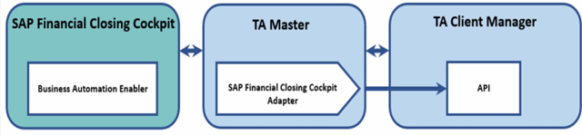
This diagram illustrates the interaction between the SAP Financial Closing Cockpit, SAP Financial Closing Cockpit Adapter, Tidal Client Manager and Tidal Master.
More Tidal integrations
Automation fabrics: Discover intelligent orchestration
How will your SAP and non-SAP processes transform with Tidal?
Tidal and SAP Financial Closing Cockpit integration FAQs
-
What is the main benefit of using Tidal with SAP Financial Closing Cockpit?
Tidal by Redwood turns SAP Financial Closing Cockpit (FCC) task execution into an orchestrated, end-to-end process that spans SAP and non-SAP systems. It brings centralized scheduling, advanced dependency management and real-time monitoring to financial close processes.
-
How can Tidal orchestrate end-to-end workflows, ensuring that SAP Financial Closing Cockpit tasks run in the correct sequence with these non-SAP jobs?
Tidal by Redwood excels at orchestrating complex, end-to-end workflows across diverse IT landscapes, which is crucial for modern financial close processes that often extend beyond SAP. Here’s how Tidal achieves this, ensuring SAP Financial Closing Cockpit (FCC) tasks run in the correct sequence with non-SAP jobs:
- Centralized orchestration engine: Tidal acts as a central "conductor" for all your automated processes. Instead of managing separate schedulers or scripts for different platforms, you define the entire end-to-end financial close workflow within Tidal. This includes tasks within SAP ECC or S/4HANA (like specific FCC task lists or individual closing steps), data extraction and transformation jobs on ETL platforms, data loading into consolidation engines, report generation in BI tools and even file transfers or custom script executions on various operating systems.
- Rich dependency management:
- Cross-platform dependencies: Tidal allows you to define dependencies between jobs regardless of where they run. For example:
- An SAP FCC task (e.g., "Perform intercompany reconciliation") can be set to start only after a non-SAP job successfully completes (e.g., "Load latest transactional data into staging database from external subsidiary system").
- Conversely, a non-SAP job (e.g., "Generate consolidated financial reports in BI tool") can be dependent on the successful completion of a series of tasks or a specific milestone within the SAP FCC.
- Types of dependencies: Tidal supports various dependency types to model real-world scenarios accurately:
- Job completion: Job A must complete successfully before Job B can start.
- Event-based dependencies: A job or workflow can be triggered by business or IT events such as file arrival (e.g., an external data feed landing in a specific directory), database updates, API calls, message queue events or custom events defined by your team.
- Time-based dependencies: While foundational, these can be combined with event and job dependencies for more complex scheduling logic (e.g., "Run this FCC task list only after 6 PM and after the data validation script completes").
- Resource dependencies: Ensure jobs run only when specific system resources (like databases or application servers) are available.
- Conditional logic: You can build "if-then-else" logic into your workflows. For instance, if a data validation job (non-SAP) finds discrepancies, Tidal could trigger an alert and hold the subsequent SAP FCC data posting task or even trigger an alternative remediation workflow.
- Adapters and integrations: Tidal utilizes a comprehensive library of adapters to connect natively with a wide range of systems and applications. Tidal’s SAP adapters offer deep integration for SAP jobs and interfacing with components like FCC. The SAP FCC adapter facilitates initiating, monitoring and retrieving status/logs from SAP tasks directly within Tidal. Similarly, adapters for databases (Oracle, SQL Server, DB2), ETL tools (Informatica, DataStage), BI platforms, operating systems (Windows, Linux, UNIX) and cloud services enable Tidal to manage jobs on those platforms as part of the unified workflow.
- Visual workflow design and monitoring: You can design these complex, cross-platform workflows graphically in Tidal, making it easier to visualize dependencies and the flow of execution. During execution, Tidal provides a single pane of glass to monitor the entire financial close process, showing the status of SAP FCC tasks alongside related jobs in other systems.
-
When automating our SAP Financial Closing Cockpit processes with Tidal, what capabilities does Tidal offer for real-time monitoring of the overall closing status, proactive alerting for exceptions or delays in FCC tasks, and for centralized error handling and reporting that combines information from both SAP and Tidal?
- Real-time monitoring and overall closing status:
- Centralized dashboard/view: Tidal offers a "single pane of glass" through its client interface (often web-based) where you can monitor the real-time status of all jobs and workflows, including those interacting with SAP FCC. This provides an immediate overview of the entire financial close process, not just isolated SAP tasks.
- Critical path monitoring: Tidal can highlight the critical path of your close process, helping you focus on the sequences of jobs whose delay would directly impact the overall completion time.
- Estimated start/end times and SLA tracking: Tidal often provides predictive capabilities, showing estimated start and end times for jobs based on historical data and current dependencies. You can define service-level agreements (SLAs) for critical parts of your close (e.g., "All month-end journals posted by Day+1 10 AM"), and Tidal will monitor progress against these SLAs.
- Graphical workflow monitoring: You can visually track the progress of your financial close workflows. Jobs are typically color-coded by status (e.g., running, completed, failed, waiting for dependencies). This allows for quick identification of bottlenecks or issues.
- SAP task status integration: Through its SAP adapter, Tidal can fetch and display the status of tasks running within SAP FCC. This means users don't necessarily need to switch between Tidal and SAP to understand what's happening. It can reflect statuses like "Scheduled," "In Process," "Completed," "Error" or custom statuses from FCC if the integration supports it.
- Proactive alerting for exceptions or delays:
- Customizable alerts: Tidal allows you to configure alerts for a wide range of conditions:
- Job failures: Immediate notification if any job (SAP FCC-related or non-SAP) fails
- Overdue jobs: Notifications if a job runs longer than its average or a predefined maximum duration
- Resource issues: Alerts related to agent availability or connectivity problems
- SLA breaches: Alerts if a job or workflow is predicted to miss its deadline or has already missed it
- Specific error codes/messages: Alerts can often be triggered based on specific error codes or messages returned from SAP or other systems
- Multiple notification channels: Alerts can be delivered through various channels to ensure they reach the right personnel promptly:
- Dashboard alerts in the Tidal interface
- Integration with ITSM tools (e.g., ServiceNow, Jira) to automatically create incident tickets
- SMS
- SNMP traps (for integration with enterprise monitoring systems like Nagios, Splunk, etc.)
- Escalation paths: Alerting rules can often include escalation paths, where if an issue isn't acknowledged or resolved within a certain timeframe, the alert is escalated to a different group or individual.
- Customizable alerts: Tidal allows you to configure alerts for a wide range of conditions:
- Centralized error handling and reporting:
- Automated recovery/restart:
- Tidal allows for configurable automated recovery actions, such as retrying a failed job a certain number of times with specific delay.
- For more complex scenarios, you can define conditional logic to run alternative jobs or workflows if a particular error occurs.
- Manual intervention options are also available, allowing operators to hold, skip or force-complete jobs after investigation.
- Combined information: The key benefit is that Tidal combines operational data from SAP FCC (via its adapter) with data from all other integrated systems. This provides a holistic view of errors and performance that is difficult to achieve when monitoring systems in isolation.
- Comprehensive reporting and auditing:
- Audit trails: Tidal maintains a detailed audit trail of all job executions, status changes, user actions and modifications to schedules or job definitions. This is crucial for compliance and post-mortem analysis.
- Historical performance reporting: You can generate reports on job runtimes, success/failure rates, SLA compliance and resource utilization. This helps in identifying trends, optimizing schedules and capacity planning.
- Error analysis reports: Reports can be generated to analyze common errors, helping to identify systemic issues in the financial close process or underlying applications.
- Consolidated job logs: Tidal centralizes the logs and output from all jobs it manages. For SAP FCC tasks, Tidal's adapter retrieves relevant job logs, spool files and error messages from SAP, making them accessible directly within the Tidal interface. This significantly speeds up troubleshooting as users don't need to manually log into SAP systems to find error details.
- Standardized error management: Errors are presented in a consistent manner within Tidal, regardless of the originating system. You can see the error, the job that failed, its dependencies and its position in the overall workflow.
- Automated recovery/restart:
- Real-time monitoring and overall closing status: